Release Date 05.10.2026
Highlights
New widgets system for easily sharing links in the in-game chat.
Automatically cycling through your camera bookmarks.
Schedule Zones let you draw an area on the map and send a Seedling to work there. Set a Harvest priority and they clear the wild trees, shrubs and stones inside it on their own, no TODO list needed.
The Delivery Panels under your building/business have been completely redesigned to showcase more information around delivery statuses and client/business operations.
Schedule Zones
Give your Seedlings a dedicated area to work in with Schedule Zones. Draw and name a zone in the Land Planner's new Schedule Zones tab, then choose it as a schedule block's location and set your priorities.
Harvest an area automatically. Set the Harvest priority and your Seedling works through every wild resource in the zone in turn, so you never queue them one by one.
Work beyond your borders. Draw zones on your society’s land, across plots you have access to, or on neutral land outside your society’s territory.
Include your workshops. Seedlings can work in buildings within the zone too. Hauling stays between containers inside the zone, so make sure the supplies and storage they need are included.
Keep your own work areas. Zones are private and can only be assigned to your own Seedlings. Every Cultivator has a fixed number of zones, and your society shares an overall limit across all its members.
You can show or hide your zones under Zones in the Visibility menu. For now, changing a zone’s size or position means deleting it and drawing a new one. Deleting a zone also removes its associated schedule blocks.
Widgets
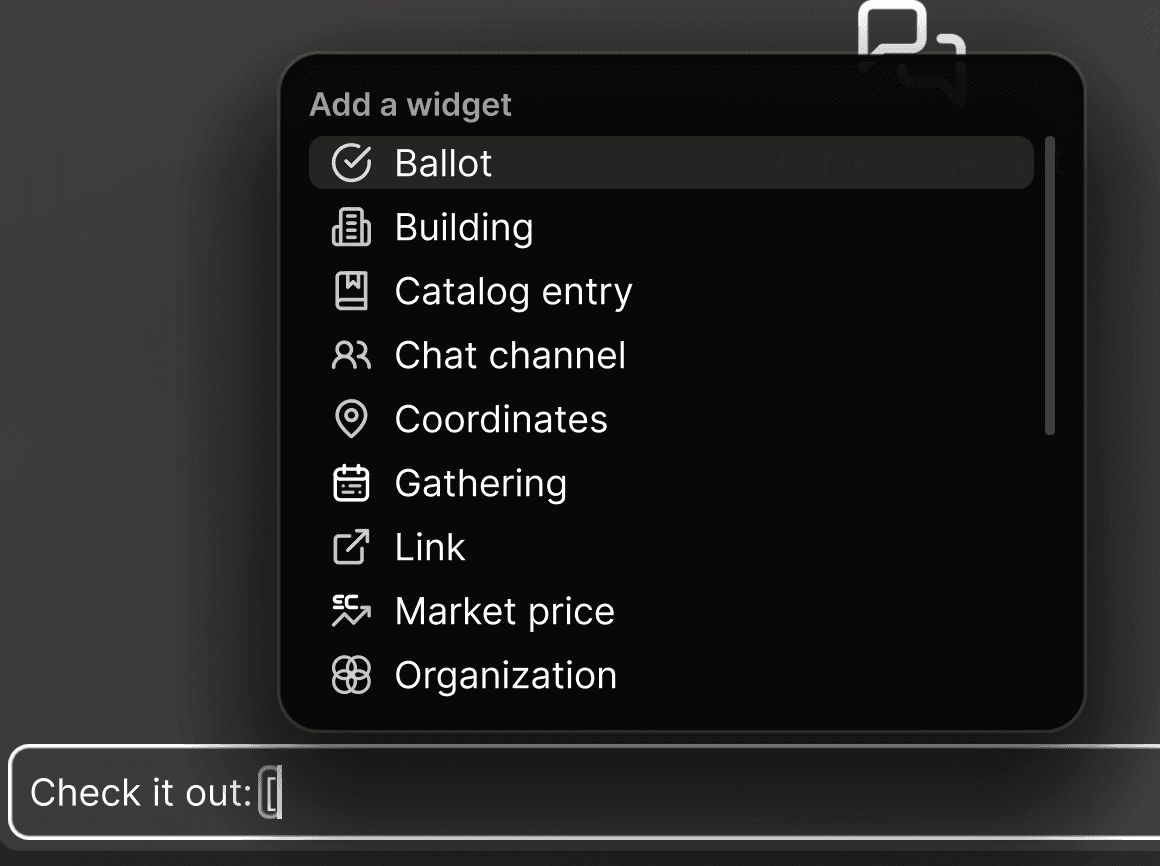
New in-line widget system for society announcements and player chat. Type a “[“ and a pop-up will allow you to share all kinds of useful links. You can share your current camera position, a link to a ballot, something in the object catalog, and much more.

Notifications
Notification text across the game has been re-written for clarity.
A Seedling's death now sends a single pop-up that states the cause (for example "died of starvation" or "died of old age") instead of a separate pop-up plus a generic "died" notification. A severe ailment sends one alert instead of two.
Inheritance
Upon Seedling death, their Wallet and Properties are held for the player to distribute. A new UI allows the Cultivator to choose an heir for each category: It can be any Seedling in the Society, or the Society itself.
If no heir is chosen for 7 days, a Society representative (a Leader, a Treasurer, or a person granted the ‘Manage Escrow Accounts’ permission) can take over stale estates and transfer them to the Society.
After 90 days of inactivity, such stale estates are automatically claimed for their society.
Elections and governance
Fix: When an election with more than one position ends (like a parliament), the role is now given to every winner and only losers are removed, instead of sometimes making a winning incumbent lose their seat or leaving too many holders.
Fix: On a closed ballot's results, the actually-elected candidates are highlighted, instead of the top rows regardless of votes. Constitution, law, and ban ballots now highlight their result too.
Fix: A department's "Managed by ..." banner now lists only the roles that can actually manage that department's roles.
Societies
Society furnishing goals now also count Sanitation items (showers, sinks, toilets) and Storage items (chests, wardrobes).
The Tier 5 City society goal text now says "Place 1 Electronics Workbench", instead of "Electronics Table".
Fix: A society's Total Wealth no longer double-counts business wallets, and the treasury no longer is included in the Businesses data.
Businesses and services
The Business window's Deliveries panel reworked. Overview tab: revenue graphs, completed and failed delivery counts, top clients, and improved employee coverage visualization. Deliveries tabs: more insight into deliveries’ statuses, better readability and failure communication.
Fix: A Seedling with a recurring schedule slot at a venue no longer leaves a 3-star review on visits where it neither wanted nor tried to get any service.
Fix: When one activity satisfies two advertised services (a bed restoring Rest and Energy), the served count and review now credit the service the Seedling actually came for, instead of a random pick.
Fix: A review now lists the service the Seedling came for as missed when nobody provided it, even if the Seedling used another service while waiting, instead of a misleading "Served in Full".
Fix: The machine-power and delivery-service toggles in the Business window no longer wrongly flip.
Production and crafting
Ore extraction speed now comes from the Harvesting and Ore Mining skills instead of Crafting, on all 12 ore extractor schematics.
Fix: When the server refuses a Quick Produce request, a dialog now says why.
Fix: Crafting a Fancy Storage Shelf and 8 other wood-only carpentry items now counts toward the Woodworking interest, which previously stayed at 0%.
Fix: A container marked for packing now cancels the pack if someone placed some resource in it, instead of destroying the container and dumping its contents as a loose pile.
Fix: Harvest byproducts (like herb seeds) cannot fall outside the farm field's plot.
Fix: Confirming a farm field design the server rejects now shows the rejection reason, instead of acting as if the fields were placed.
Inventory and Storage fixes
Fix: items no longer disappear from a seedling's inventory when the seedling migrated to another sector while carrying a full inventory.
Fix: items no longer disappear from a seedling's inventory when it picked up exactly as much as it could carry.
Fix: items no longer disappear when a haul or delivery was canceled or expired while the container holding them was over capacity.
Fix: an issue in which a delivery drone could lose the cargo it was carrying.
Storage Capacity Update
As announced, we held back on applying the container capacity rebalance to existing containers (only newly built ones got the new values) to give everyone time to prepare. With this update, existing containers and delivery drones will be updated to the new capacities. Here's how it works:
Every existing container and drone whose capacity changed in the earlier rebalance moves to its new value.
Increased capacity: it just goes up. Nothing else changes.
Decreased capacity: if a container holds more than its new limit, nothing is lost. It keeps everything but won't accept anything new until enough volume is taken out to get below the limit. Drones carrying more than their new capacity will finish the haul they're on. After that, they'll use the lower capacity for all future hauls.
Buildings and construction
Fix: A window is now credited to the room its wall actually faces. A room without a window is no longer scored "Bright" while the room with the window counts as dark.
Fix: When a resource pile blocks construction, the warning now says to pick up its contents to clear it.
Fix: Build Mode's footer no longer shows "CTRL + click to Delete" while a tool that cannot delete anything is active.
Fix: Seedlings can no longer autonomously haul items into a building's containers just by visiting an open service location there. Hauling into a building now requires full access (owner, admin, role holder or resident).
Fix: A player directly controlling their Seedling can no longer haul items out of a building they are only visiting via a private transfer.
Seedlings
Fix: A fainted or unconscious Seedling can no longer be told to start a conversation
Fix: When a seedling’s navigation is interrupted, it now brakes smoothly to a stop instead of sometimes snapping backwards to an earlier position.
Fix: Hovering a Seedling's harvest activity shows the Yields row again (for example "x4 lumber".
Fix: Seedling Chat entries about going to a building, being hired or fired, or reviewing a venue now name the actual building instead of "something" or "somewhere"
Fix: In the Add Seedling panel, clicking a Seedling's fertility icon no longer gets swallowed by an overlapping thought bubble.
Fix: Migrated seedlings no longer appear in the Seedling Switcher
Society Selection & World View
The Societies list now has filters and sorting. Sort by tier or access, or open the expanded view to see and sort by population and claimable plots when deciding where to migrate.
Maintenance, login and connection
Improved the user experience in the game client for planned downtime state. The game will now automatically restart when the downtime is over.
Fix: When entering a society fails, the client now correctly clears the faulty state and allows you to start over or select a different society.
Fix: Various UI panels (like a container's contents) no longer get stuck on stale data after a reconnect.
Fix: The game no longer crashes right after being closed, for example when using Alt+F4 during the loading screen.
Fix: Performance improvements for license checks on slower or busy connection
Fix: Buttons that open the SEED Store from inside the game (Add Seedling panel, inventory, Pollen Exchange, subscription dialog, health view) work again.
Fix: The 3-day trial invite popup now keeps appearing each session until the code is used or you tick "Don't show this again",
Camera
You can now trigger an automatic cycle of your camera bookmarks, with customisable travel and stop times. Start it from the camera bookmarks menu or with Ctrl+Space.
Bookmark cycling moves from Ctrl+[ and Ctrl+] to Ctrl+Left and Ctrl+Right, and bookmark shortcuts work with the UI hidden.
Accessibility and settings
Status effect chips show an up arrow for a buff and a down arrow for a debuff, and a schedule conflict shows a warning triangle on top of the red hatch, so the states are readable without color.
User Interface
Every slider in the game gets a new look.
Fix: The Orbital Storage panel's "Item in Transfer" state shows a package icon instead of a broken placeholder, and its text no longer runs past the card edge.
Fix: The Scheduler's Invitations tab scrolls now.
Fix: Hovering over a reserved resource stack in a storage grid now explains why it can't be dragged.
Fix: In a group's Invite Seedlings panel, a Seedling with a pending invitation shows an "Invited" badge instead of being greyed out with no explanation.
Fix: Opening a Cultivator's profile from Global Chat now shows portraits and names of their Seedlings living in another sector, instead of a blank grey circle.
Fix: When a Cultivator's only Seedling dies, the Seedling Switcher no longer shows a broken missing-texture card.
Objects and catalog
The Object Catalog's system containers each have their own name now, like Spaceport Inbox, Kernel Inbox and Construction Site Inbox.
Monkey Bars no longer wear out 5 times faster outdoors, since outdoors is their intended place.
The Wallet app icon and the Marketplace and Societies window icons have new artwork.
Fix: The Object Catalog's detail panel no longer shows a "Storage capacity" row for beds, lamps, machines and other items that aren't player storage.
Fix: The Small Mineral Extractor and Minimalist Mug icons no longer show a light square behind them.
Dezima event reward statues are added.



Mobile app (Seed Companion)
New:
Production support in companion app! Quick produce and Machines management is now available when inspecting production machines in the world view.
Focus mode Development tab. Choose new interests and claim perks on the go.
New option in application settings that allows you to turn off the animated background ripples in UI.
Improvements:
Updated the way the mobile app displays container contents in world view. Inspecting a container now shows the stored items in a grid. Tap on an item to show interaction options to perform actions on it.
Improved tooltips support. Some UI elements did not open tooltips when tapping/holding them. This is now fixed and tooltips experience is improved.
Improved the current activity display in world view: instead of showing the reason all the time under activity name, it now shows more information about the performed activity (for example what Seedling is producing) and tapping it shows the reason and the abort button.
Fixes:
Fix: Focus Mode now opens reliably